
Funding Requests
The Verein exists to enhance the learning experience of the students – as stated in our mission. This includes supporting the initiatives of teachers, who take a leading role in the student’s educational experience.
What does The Verein fund?
The Verein supports measures that promote the intellectual abilities and sporting achievements of the pupils of the John F. Kennedy School, their social skills and strengthen their sense of community. It also supports the school’s tasks. In addition, the promotion of charitable purposes within the meaning of § 53 AO is pursued.
This purpose is achieved in particular by raising and granting funds for class trips, excursions, sporting events and school performances, for subsidies for the purchase of teaching materials, books, and other items which serve to promote the school’s tasks, as well as for additional subsidies to support needy and eligible pupils and to support school leavers for their studies.
The Verein generally funds the needs of initiatives where there is either not enough funding or it does not exist. Where funding exists and this funding has been exhausted is a matter for the board to use discretion and attempt to adhere to precedence of past decisions. Each funding need is unique; however, many fall into the following categories:
The Verein will not approve funding if the request would put the non-profit, tax-free status of the Verein at risk.
- matching funds needed,
- funding from other sources is exhausted,
- funding from other sources does not exist,
- funding from other sources is being withheld or distributed unevenly
Request Funding
In order to request funding from The Verein, please first read these Frequently Asked Questions, then fill and submit this funding form.
Once your funding request was approved and it is time for payment, please read the following instructions for members and for non-members of the Verein:
There are three principles for receiving money from the Verein: it must be permitted, transparent, and simple. We want to avoid unnecessary bureaucracy, but it is also not acceptable for everyone to act without clear rules. At the same time, the process must be scalable and repeatable.
If you are a member of the Verein, please log in to our membership system EasyVerein and select “Submit Expense” under “My Data”. Instructions on how to complete the form can be found in the section: Reimbursement of Expenses for Members.
If you are not a member, a similar form is available in PDF format. Details on the required information can be found here: Reimbursement of Expenses for Non-Members.
For Better Understanding
The budget plan is truly just a plan. The amounts shown in it are not automatically paid out. Any actual payment always requires a resolution of the Board.
Such a resolution may apply in three ways:
- as a one-time approval (for example, a grant request),
- for a series of payments that may be linked to a project with a defined start and end (for example, a Fun Day), or
- as an ongoing approval for recurring payments without a fixed end date (for example, monthly bank fees).
All three types are recorded in a single list of Board resolutions. In doing so, we ensure that no more is paid out than has been approved. If a resolution covers multiple payments, we must track what has already been paid. For this purpose, we create a code for a department/project in EasyVerein. To capture additional details, we often also maintain a Google Sheet to provide a clearer overview of what funds are being used for and who receives them. In many cases, however, it is sufficient simply to submit a receipt, and the reimbursement will be transferred within a few days.
| Method | Typical Processing Time | Background |
| Via EasyVerein “Submit Expense” | 24 hours to 1 week | The receipt is recorded directly in the accounting system. If the Treasurer is working on it and your account is with Commerzbank, the payment may arrive as early as the next day. |
| Via PDF form by email | 48 hours to 1 week | All information is available digitally, but still needs to be entered into the accounting system. |
| Sending information and receipts in an unstructured way | 2–8 weeks | Without a form, important information is often missing and must be reconstructed manually. Additionally, someone must compile everything into a usable digital format for accounting. |
Um Geld vom Verein zu erhalten, gibt es drei Regeln: Es muss erlaubt sein, nachvollziehbar und einfach. Wir wollen keine unnötige Bürokratie, aber es geht auch nicht, dass jeder macht was er will. Und wir müssen es tausendfach wiederholen können.
Wenn Ihr Mitglied im Verein seid, dann meldet Euch bitte in unserer Mitgliederverwaltung “EasyVerein” an und wählt unter “Meine Daten” die Option “Auslage einreichen”. Wie die Felder auszufüllen sind, lest Ihr in dem Abschnitt: Reimbursement of Expenses for Members.
Wenn Ihr kein Mitglied seid, dann gibt es für Euch ein ähnliches Formular im PDF-Format. Welche Informationen wir dann benötigen, lest Ihr in dem Abschnitt: Reimbursement of Expenses for Non-Members
Zum besseren Verständnis
Der Haushaltsplan ist wirklich nur eine Planung. Was dort drin steht, wird nicht ohne weiteres auch ausgezahlt. Für eine konkrete Auszahlung braucht es immer einen Beschluss des Vorstands.
Dieser Beschluss kann:
- einmalig gelten (zum Beispiel für einen Antrag auf einen Zuschuss),
- für eine Reihe von Zahlungen, die wiederum zu einem Projekt mit Anfang und Ende gehören können (zum Beispiel ein Fun Day) oder
- ohne Ende in regelmäßigen Abständen wiederkehren (zum Beispiel monatliche Kontogebühren).
Alle drei Arten werden in EINER Liste von Vorstandsbeschlüssen zusammengefasst. Dabei achten wir darauf, dass nicht mehr gezahlt wird als genehmigt wurde. Gilt ein Beschluss für mehrere Zahlungen, dann müssen wir mitschreiben, was bereits gezahlt wurde. Dazu legen wir in EasyVerein einen Code für Abteilung/Projekt an. Um zusätzliche Details zu erfassen, legen wir oft auch ein Google Sheet an, um schneller überblicken zu können, wofür Geld bezahlt wird und wer es bekommt. In vielen Fällen reicht Ihr aber auch einfach nur den Beleg ein und bekommt ein paar Tage später das Geld überwiesen.
| Einreichen von Belegen zur Erstattung | Typische Dauer | Hintergrund |
| Mittels EasyVerein “Auslage einreichen” | 24h bis 1 Woche | Der Beleg landet hier direkt in der Buchhaltung. Wenn der Schatzmeister am PC sitzt und Euer Konto bei der Commerzbank ist, dann kann das Geld durchaus am nächsten Tag auf eurem Konto sein. |
| Mittels PDF Formular per Email | 48h bis 1 Woche | Auch hier haben wir alle Informationen digital vorliegen, müssen sie aber noch in die Buchhaltung laden. |
| Wahlloses Zusenden von Informationen und Belegen | 2-8 Wochen | Mangels Formular fehlen häufig Informationen und müssen erst detektivisch zusammengesucht werden. Und es muss sich jemand finden, der alles für die Buchführung digital zusammenbastelt. |
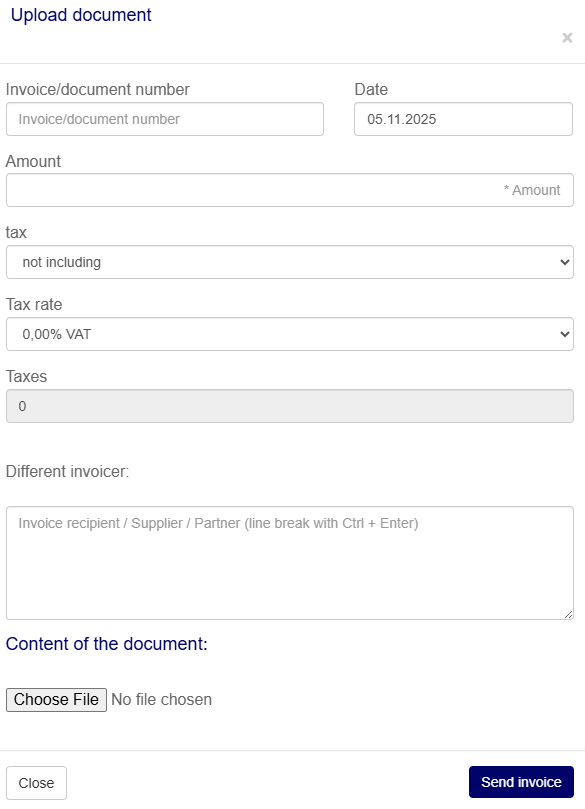
To submit a receipt as a member and receive reimbursement, you only need three things: the Board resolution number, the amount, and the receipt.
The form for submitting receipts is available via the membership system and can be used by all Board members and volunteers. To access it, please first log in to the membership system, preferably using this link. Then navigate to “My Data” / “Submit Expense” to access the form shown below.
- In the field “Invoice/Document Number”, enter the Board resolution number (see remark 1 below). A list of all such numbers can be found here.
- In the “Amount” field, enter the amount to be reimbursed. This is the total amount shown on the receipt, including delivery costs and taxes, minus any discount (e.g. cash discount).
- Next, upload exactly one receipt file (see remark 2 below). If you have multiple receipts, you must first combine them into a single file (see remark 3 below). Alternatively, you may submit the process multiple times and receive separate reimbursements. However, please avoid excessive submissions, as each bank transaction incurs fees for the Association.
- The reimbursement will be transferred to the IBAN stored in EasyVerein for your membership. If you would like the payment to be sent to a different account, please enter the alternative recipient’s name and IBAN in the field “Different Invoicer”.
- The “Date” field is set to the current date and can be left unchanged.
- Please leave the fields for tax, tax rate, and taxes as they are.
- If you have important additional information, please include it as a PDF and combine it with the main receipt file.
Please do not forget to attach the receipt file. Otherwise, the submission will fail and you will need to enter everything again. Finally, click “Send Invoice” — done!
Remarks
(1) Decisions made in the past that remain valid today have also been assigned numbers retrospectively. If a decision was adopted only recently and is not yet listed, please request the number by email at info@theverein.com.
(2) The receipt must be submitted as exactly one PDF file. If you have text files, emails, photos, or scans, you must first convert them into PDF format. The easiest way to do this is by using the free tool collection available at https://tools.pdf24.org/en/. The “Images to PDF” function can be used to convert images.
(3) If you have multiple PDF files, you must combine them into a single PDF file. The “Merge PDF” tool can be used to merge multiple files into one PDF. The resulting file can then be downloaded and uploaded via the link to the Association’s accounting system.
Um als Mitglied einen Beleg einzureichen und den Betrag überwiesen zu bekommen, benötigt Ihr nur drei Dinge: die Nummer des Vorstandsbeschlusses, den Betrag und den Beleg.
Das Formular zum Einreichen von Belegen steht über die Mitgliederverwaltung zur Verfügung, und zwar für alle Vorstandsmitglieder und alle Freiwilligen. Hierzu meldet Euch bitte zunächst in der Mitgliederverwaltung an, am besten mit diesem Link. Anschließend erreicht Ihr unter “Meine Daten” / “Auslage einreichen” das weiter unten abgebildete Formular.
- Bei “Rechnungs-/Belegnummer” tragt Ihr die Nummer des Vorstandsbeschlusses ein (siehe Anmerkung 1 unten). Eine Liste aller dieser Nummern findet Ihr hier.
- In das Feld “Betrag” kommt natürlich der zu überweisende Betrag. Dabei handelt es sich um den Betrag, der auf dem Beleg als Summe ausgewiesen ist, einschließlich gezahlter Lieferkosten und Steuern, abzüglich eines etwaigen Skontos.
- Anschließend ladet Ihr genau eine Beleg-Datei hoch (siehe Anmerkung 2 unten). Bei mehreren Belegen müsst Ihr sie zunächst kombinieren (siehe Anmerkung 3 unten). Oder Ihr führt den ganzen Vorgang “Auslage einreichen” mehrfach durch und bekommt dann auch separate Erstattungen. Übertreibt es aber bitte nicht, jede Banktransaktion kostet den Verein Gebühren.
- Das Geld wird dann an die IBAN überwiesen, die für Eure Mitgliedschaft in EasyVerein hinterlegt ist. Wenn Ihr das Geld woanders hin überwiesen bekommen möchtet, dann gebt bitte diesen anderen Empfänger mit Name und IBAN im Feld “Abweichender Rechnungssteller” an.
- Das Feld “Datum” ist auf den aktuellen Tag eingestellt. Das könnt Ihr so lassen.
- Die Felder Steuer, Steuersatz und Steuern lasst Ihr bitte wie sie sind.
- Wenn Ihr wichtige Zusatzinformationen habt, dann druckt sie bitte auch als PDF und kombiniert sie mit dem eigentlichen Beleg.
Bitte nicht vergessen, die Beleg-Datei anzuhängen. Ansonsten scheitert der Vorgang und Ihr müsst alles nochmal eintippen. Am Schluss “Rechnung abschicken” anklicken – fertig!
Anmerkungen
(1) Auch Beschlüsse der Vergangenheit, die bis heute Gültigkeit haben, wurden rückwirkend nummeriert. Sollte der Beschluss erst vor kurzem gefasst und in der Liste noch nicht verzeichnet sein, dann erfragt die Nummer bitte per Email an info@theverein.com
(2) Der Beleg muss in Form genau einer PDF-Datei vorliegen. Wer Text-Dateien, E-Mails, Fotos oder Scans hat, der muss sie zunächst in ein PDF-Format umwandeln. Der einfachste Weg hierzu ist die Werkzeug-Sammlung https://tools.pdf24.org/en/, die kostenlos zur Verfügung steht. Mit Images-to-PDF können Bilder umgewandelt werden.
(3) Wer mehrere PDF-Dateien hat, der muss sie zu einer PDF-Datei kombinieren. Mit Merge PDF können Dateien zu einem PDF zusammengefügt werden. Anschließend kann die Ergebnisdatei heruntergeladen und anschließend über den Link zum Verein Buchhaltungssystem hochgeladen werden.
To submit a receipt and request a payment without being a member of the Verein, you need (just like members) three things: the Board resolution number, the amount, and the receipt. In addition, you must tell us who the payment should be made to and whom we can contact in case of questions. We recommend using this form to provide all required information.
- The Board resolution number is absolutely required. Without it, we cannot process your request. A list of all Board resolution numbers can be found here (see remark 1 below).
- In the “Amount” field, enter the amount to be transferred. This is the total amount shown on the receipt, including delivery costs and taxes, minus any discount (e.g. cash discount).
- We can either reimburse you if you have already paid a third party, or we can transfer the amount directly to a third party so that you do not have to pay in advance. In either case, we must clearly know who should receive the payment and require the recipient’s name and IBAN.
We recommend using this form to provide all required information. This ensures that nothing is missing and avoids follow-up questions. Please complete the form, save it to your device, and send it as a PDF attachment by email to treasurer@theverein.com. Alternatively, you may include all information directly in an email – provided you are absolutely sure that nothing is missing.
You must also include the receipt showing what the Verein is paying for. This can be an invoice that still needs to be paid or one that you have already paid. Please note: only a single receipt file can be submitted (see remark 2 below). If you have multiple receipts, you must first combine them into one file (see remark 3 below). Alternatively, you may repeat the process, submitting multiple forms and emails, in which case reimbursements will be processed separately. However, please avoid excessive submissions, as each bank transaction incurs fees for the Verein.
Remarks
(1) Decisions made in the past that remain valid today have also been assigned numbers retrospectively. If a decision was adopted only recently and is not yet listed, please request the number by email at info@theverein.com.
(2) The receipt must be submitted as exactly one PDF file. If you have text files, emails, photos, or scans, you must first convert them into PDF format. The easiest way to do this is by using the free tool collection available at https://tools.pdf24.org/en/. The “Images to PDF” function can be used to convert images.
(3) If you have multiple PDF files, you must combine them into a single PDF file. The “Merge PDF” tool can be used to merge multiple files into one PDF. The resulting file can then be downloaded and uploaded via the link to the Association’s accounting system.
Um einen Beleg einzureichen und eine Überweisung zu veranlassen, ohne Mitglied im Verein zu sein, benötigt Ihr (wie die Mitglieder) drei Dinge: die Nummer des Vorstandsbeschlusses, den Betrag und den Beleg. Zusätzlich müsst Ihr uns aber noch sagen, an wen das Geld überwiesen werden soll und an wen wir uns bei Rückfragen wenden können. Wir empfehlen Euch, für all diese Informationen dieses Formular zu verwenden.
- Die Nummer des Vorstandsbeschlusses ist absolut notwendig. Ohne die Nummer können wir Eure Anfrage nicht bearbeiten. Eine Liste aller dieser Nummern der Vorstandsbeschlüsse findet Ihr hier (siehe Anmerkung 1 unten).
- In das Feld “Betrag” kommt natürlich der zu überweisende Betrag. Dabei handelt es sich um den Betrag, der auf dem Beleg als Summe ausgewiesen ist, einschließlich gezahlter Lieferkosten und Steuern, abzüglich eines etwaigen Skontos.
- Wir können das Geld an Euch überweisen, wenn Ihr einen Dritten bezahlt habt. Oder wir können das Geld direkt an einen Dritten überweisen, damit Ihr das Geld nicht auslegen müsst. Wir müssen nur eindeutig wissen, an wen das Geld gehen soll, und brauchen Name und IBAN des Empfängers.
Wir empfehlen Euch, für all diese Informationen dieses Formular zu verwenden. Dann vergesst Ihr nichts und wir ersparen uns Rückfragen. Füllt es aus, speichert es auf Eurer Festplatte und schickt es dann als PDF-Anhang per Email an treasurer@theverein.com. Ihr könnt die Informationen auch direkt in eine Email tippen, wenn Ihr 100% nichts vergesst.
Außerdem müsst Ihr unbedingt den Beleg senden, aus dem hervorgeht, wofür der Verein das Geld zahlt. Das kann eine Rechnung sein, die zu bezahlen ist oder eine Rechnung, die Ihr bereits bezahlt habt. Achtung: Es kann wirklich nur eine einzige Beleg-Datei sein (siehe Anmerkung 2 unten). Bei mehreren Belegen müsst Ihr sie zunächst kombinieren (siehe Anmerkung 3 unten). Oder Ihr führt den ganzen Vorgang mehrfach durch, füllt also mehrere Formulare aus und hängt sie an mehrere Emails an. Dann werden wir das Geld auch separat überweisen. Übertreibt es aber bitte nicht, jede Banktransaktion kostet den Verein Gebühren.
Anmerkungen
(1) Auch Beschlüsse der Vergangenheit, die bis heute Gültigkeit haben, wurden rückwirkend nummeriert. Sollte der Beschluss erst vor kurzem gefasst und in der Liste noch nicht verzeichnet sein, dann erfragt die Nummer bitte per Email an info@theverein.com
(2) Der Beleg muss in Form genau einer PDF-Datei vorliegen. Wer Text-Dateien, E-Mails, Fotos oder Scans hat, der muss sie zunächst in ein PDF-Format umwandeln. Der einfachste Weg hierzu ist die Werkzeug-Sammlung https://tools.pdf24.org/en/, die kostenlos zur Verfügung steht. Mit Images-to-PDF können Bilder umgewandelt werden.
(3) Wer mehrere PDF-Dateien hat, der muss sie zu einer PDF-Datei kombinieren. Mit Merge PDF können Dateien zu einem PDF zusammengefügt werden. Anschließend kann die Ergebnisdatei heruntergeladen und anschließend über den Link zum Verein Buchhaltungssystem hochgeladen werden.
If you would like to provide funding to The Verein, maybe as a donation or by sponsoring one of our events, then please read this explanation of funding options before sending us money. Please be aware that under certain circumstances we have to pay taxes and cannot issue a donation receipt.
The Student Activity Fund is NOT The Verein
To learn more about the Student Activity Fund (SAF) and the relationship with the Verein, please click here.